
myARK Project Tracking
Follow your kitchen project progress, planned stages, approved documents, client actions and support records in one place.
A kitchen project involves more than installation dates. There are drawings, material selections, production stages, site access, approvals, documents, inspections and aftercare records.myARK gives ARK Kitchen clients a clearer view of these project details after the project has been formally activated.
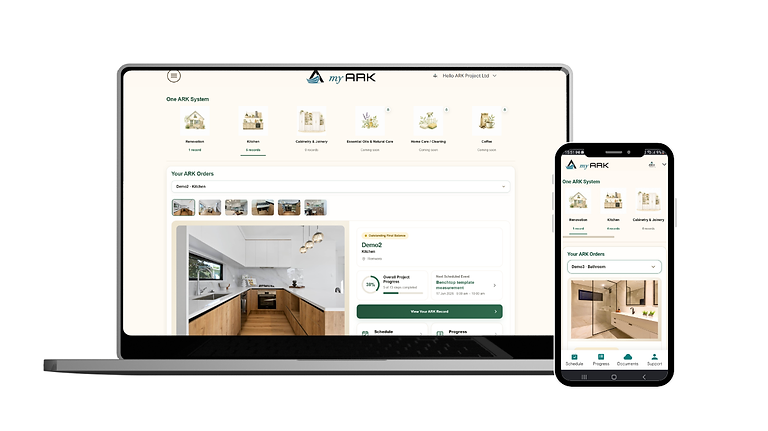
One project. One clearer place.
What you can follow in myARK
Important project information can easily become scattered across emails, messages, drawings, photos and documents. myARK brings the client-facing parts of the project into a clearer structure.
Project Support
Connect support requests to the correct project, ARKCode, materials, records and previous work.
What is an ARKCode?
An ARKCode is the unique reference connected to an activated ARK project.It helps connect the project identity across myARK, approved project records, support history, and ARK Verified where applicable.
An ARKCode does not automatically mean that the project warranty is active. Warranty status depends on the applicable completion, payment, and warranty conditions.

From activation to aftercare
One record across the project journey
myARK begins when the official project is activated and continues through production, installation, handover and relevant aftercare records.

01.
Project Activation
After the accepted formal quote, contract and confirmed deposit, ARK activates the official project and myARK access.
02.
Preparation & Production
Client-visible records may be added as materials, drawings, production preparation and factory stages are confirmed.
03.
Installation & Handover
Relevant progress, site records, inspections and approved handover documents can be connected to the project.
04.
Warranty & Aftercare
Important records can remain available to support care, warranty questions, maintenance, replacement parts and future work.
Private records and public proof
myARK and ARK Verified are different
Private client-facing system
myARK
A private project environment for approved client-facing information, project context and support records.
Progress and planned stages
Approved project documents
Client actions and approvals
Support and aftercare records
Not publicly searchable
Public-safe verification layer
ARK Verified
A separate public proof layer for approved project information that ARK is willing and permitted to make inspectable.
Public project reference where approved
Selected materials and project facts
Public status or warranty status where appropriate
No private contracts or payment details
No internal notes or unreleased documents
FAQs
